

Neurigraph — Storage and Retrieval System
Developer Specification v1.0
Section Summaries
This document is the foundational infrastructure specification for Neurigraph. Every capability built on top of Neurigraph — persistent Personas, evolving memory, long-term relationship tracking, cross-referenced knowledge — depends on what is described here. Read this document before reading any other Neurigraph specification. If this foundation is built incorrectly, everything above it will fail.
Section 0 — Glossary
Defines the specific meaning of every term used throughout this document. Terms like node, shell, metadata layer, file layer, graph index, chunk, rehydration, clean break, and predictive warming are used with precise architectural meaning that differs from casual usage. A developer must read this section before any other. Misreading a single term can produce a correct-seeming implementation that behaves incorrectly at runtime.Section 1 — Overview and Purpose
Describes what Neurigraph is and what problem it solves. Neurigraph is the persistent memory system for aiConnected. It answers a fundamental question that all AI systems face: how does an AI remember anything across sessions, across years, and across the full complexity of a real person’s life — without becoming too slow, too expensive, or too confused to be useful? The answer is a structured, hierarchical graph where every node owns its own isolated storage space. The graph is not a single searchable database. It is a navigable map of isolated databases, each containing everything known about one specific concept, relationship, or Persona. Memory is stored at the right node. Retrieval navigates to the right node and searches only there. The rest of the graph stays compressed and out of the way. This section also establishes the relationship between this document and all other Neurigraph specifications. This document describes the infrastructure layer. All other documents — Persona behavior, emotional modeling, memory evolution, cross-referencing — describe systems that run on top of this infrastructure. None of those systems can be designed or built without first understanding what this document describes.Section 2 — Infrastructure Stack
Describes every technology component in the Neurigraph storage and retrieval system, why each was chosen, and what it is specifically responsible for. The stack is: Supabase as the primary database and file storage platform, Postgres as the underlying relational engine, pgvector as the semantic search extension built into Supabase, Supabase Storage as the object storage layer for compressed file bytes, n8n as the background job system managing the compression lifecycle and storage pipeline, and an embedding model (OpenAI text-embedding-3-small or Voyage AI) for converting summaries to vectors at write and query time. Each component does exactly one job. Postgres holds metadata, embeddings, and graph structure. Supabase Storage holds compressed file bytes. pgvector finds semantically similar memories. n8n manages everything that happens on a schedule or in the background. The embedding model makes semantic search possible. No component substitutes for another. Redis is noted as an optional caching layer for working set management at scale. It is not required at initial build.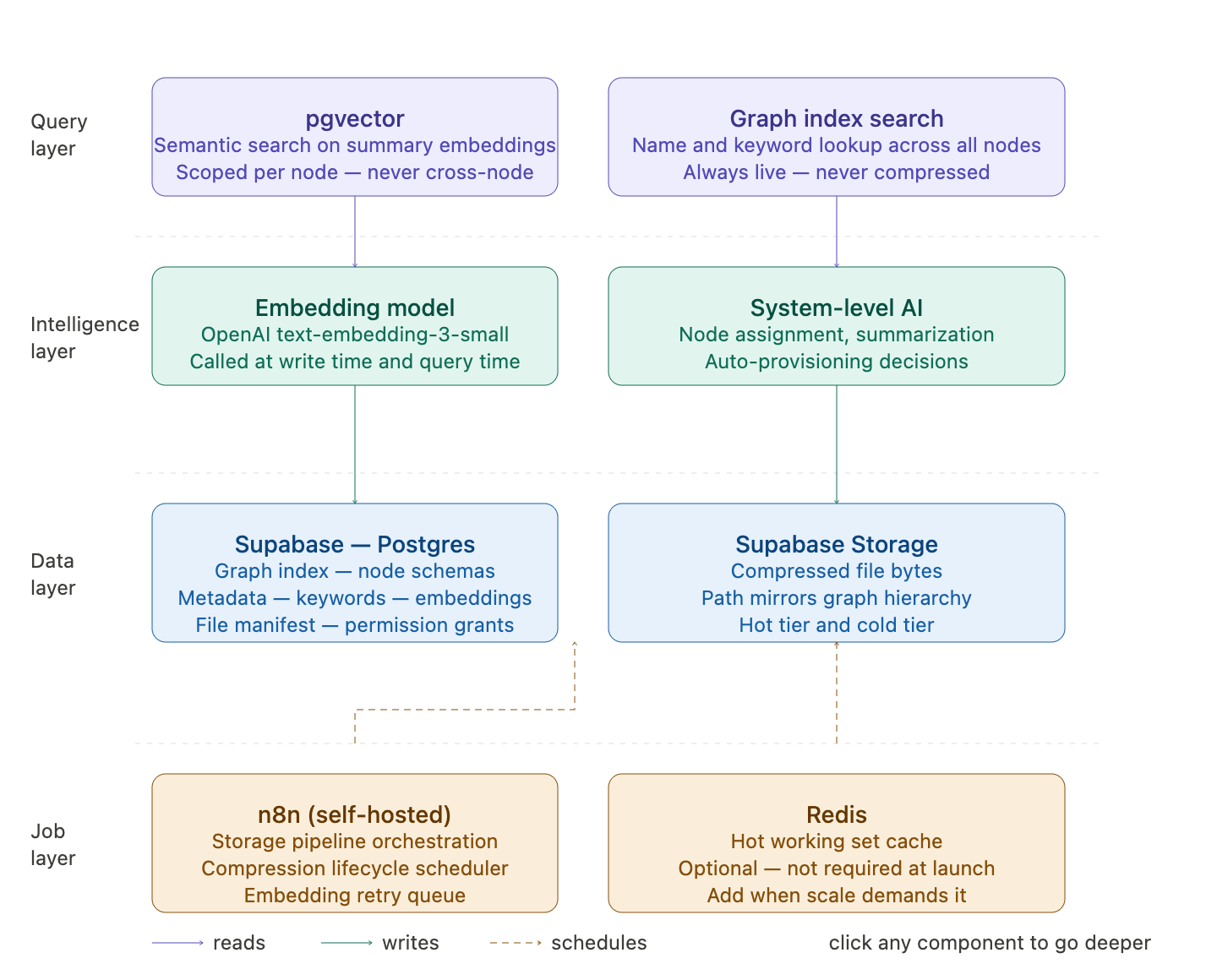
Section 3 — Graph Structure
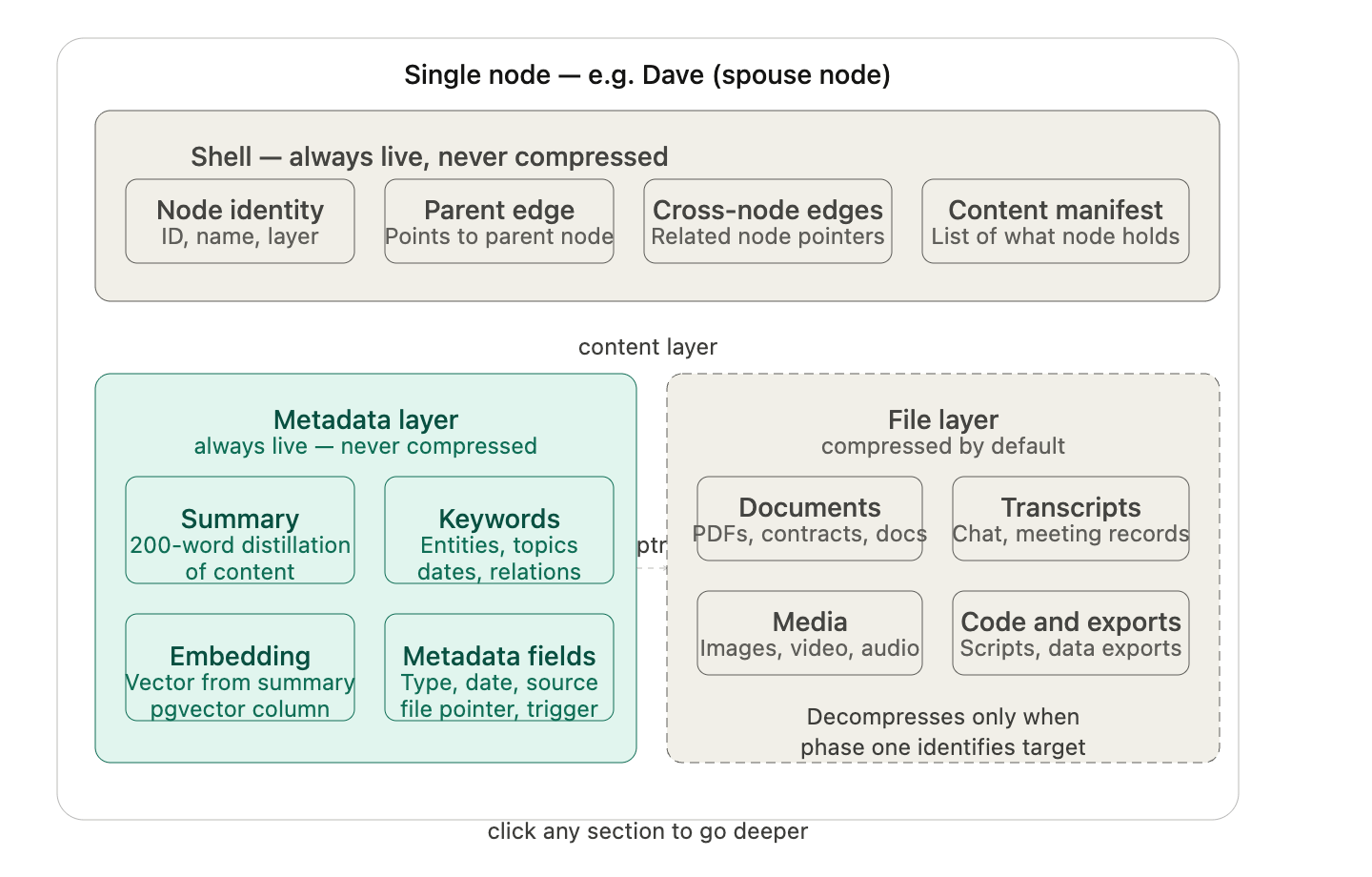
Describes the physical and logical structure of the Neurigraph. The graph is rooted at the user node — for example, Bob. From Bob, the graph branches outward through up to five layers of nodes. Each layer represents a more specific level of concept: broad topics at Layer 1 (Business, Health, Family, Hobbies), focused concepts at Layer 2 (Employees, Products, Finances), and increasingly specific sub-concepts down to Layer 5. Every node has two distinct components that behave completely differently. The shell is the node’s permanent, always-live outer layer. It contains the node’s identity, its relationships to other nodes, a manifest of what content it holds, and the compression state of its children. The shell is never compressed. It is always navigable. The content layer is where the actual data lives — metadata records, summaries, embeddings, and compressed file bytes. The content layer follows the compression rules described in Section 7. Personas are nodes. A Persona is not a special system object separate from the graph — it is a node that can be placed at any appropriate layer within the graph. A Persona at the top level of Bob’s graph represents a high-level identity. A Persona nested inside the Business node represents a role-specific agent. Personas participate in cross-node relationships exactly like any other node. Their isolation is enforced by the access control rules described in Section 9. The graph index is a flat registry table at the root level that records every node that exists, its parent, its layer depth, its schema name, its last accessed timestamp, and all of its edges to other nodes. The graph index is never compressed. It is the map of the entire universe and must always be readable. This diagram shows the overall shape of the graph — how nodes branch from the user root through five layers with Personas sitting as first-class nodes anywhere in the hierarchy. The second shows the anatomy of a single node — what the shell and content layers actually contain.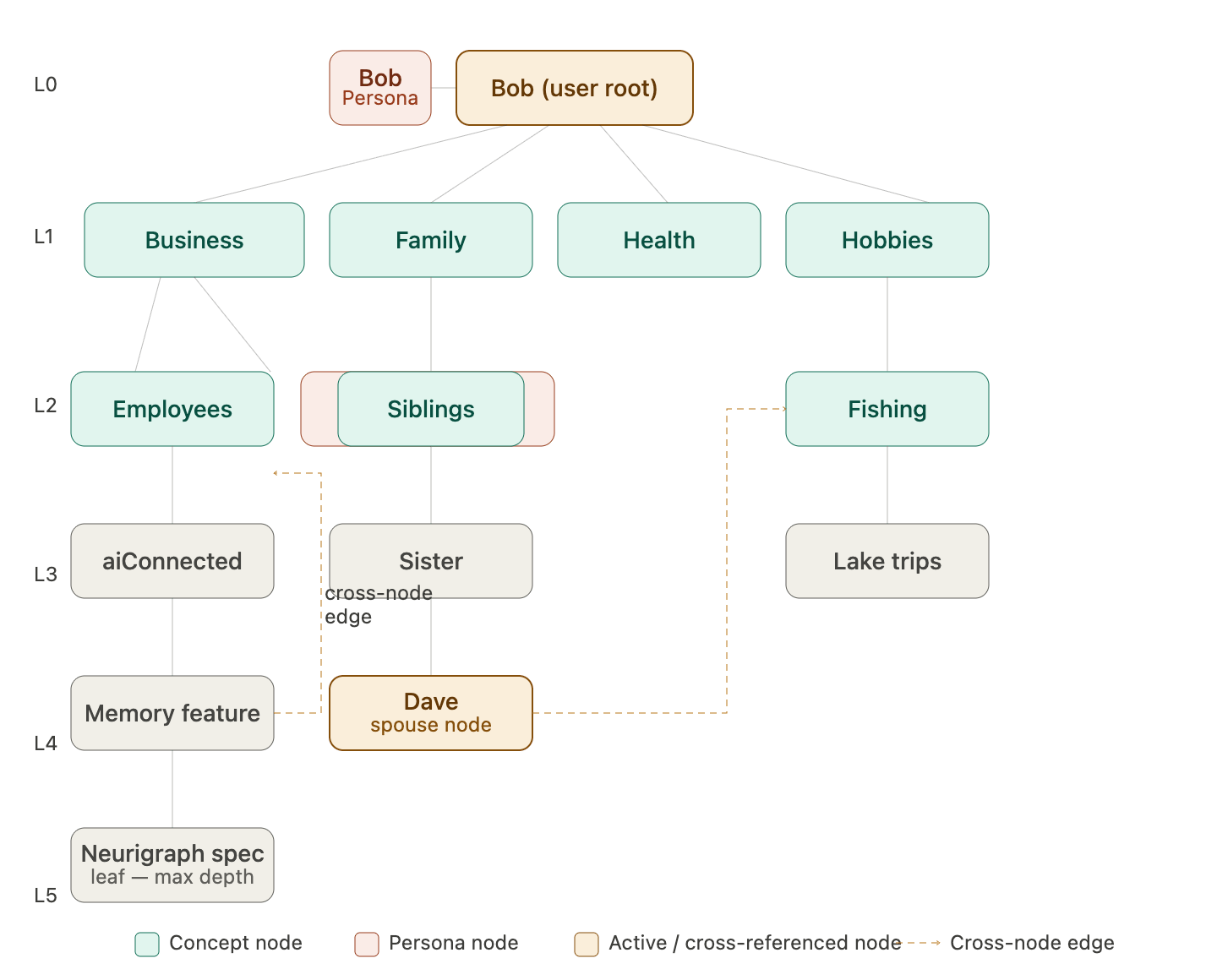
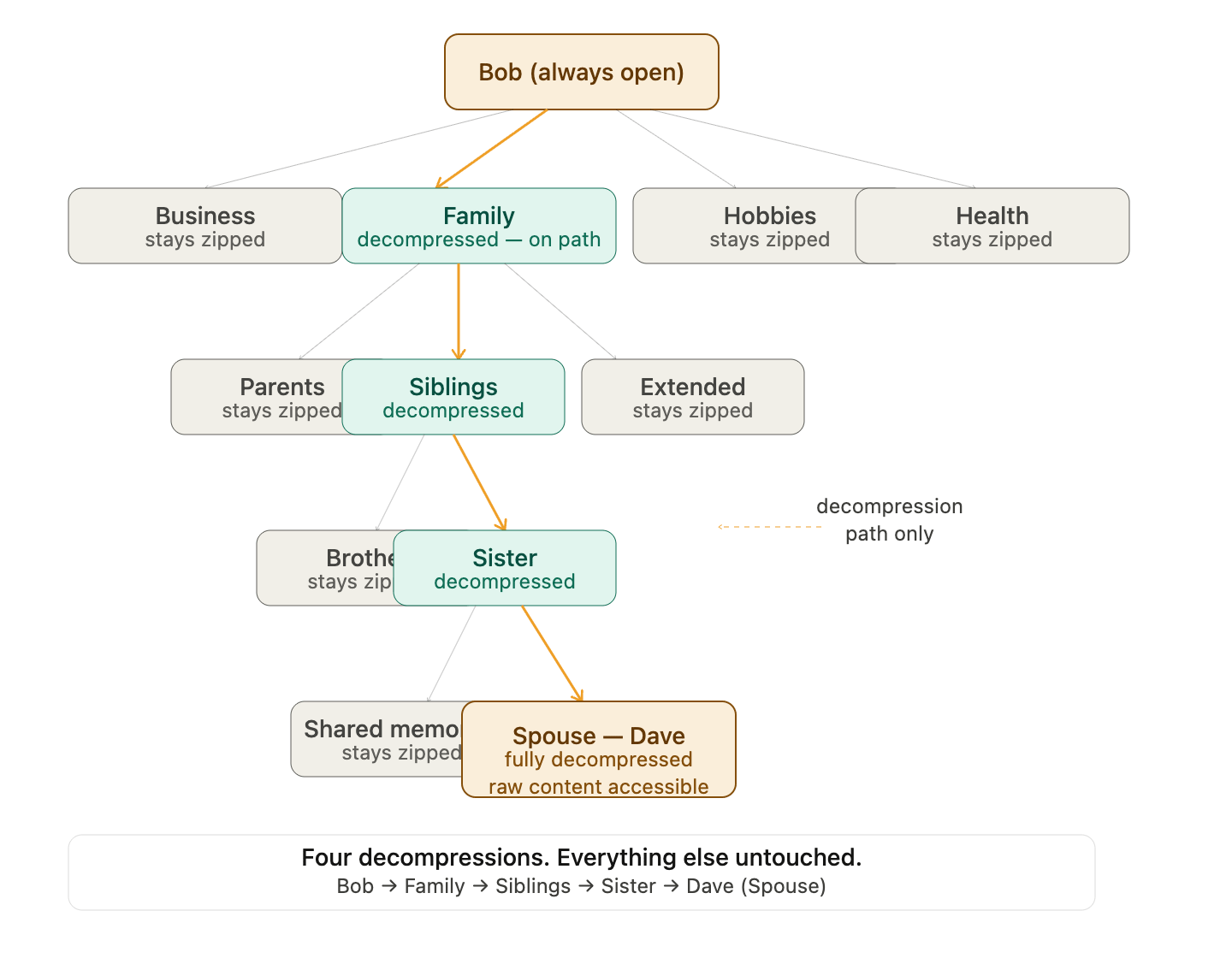
Every node is a compressed container holding compressed containers. Like a zip file containing zip files containing zip files, all the way down to the raw content at the leaf. Nothing inside a compressed node is visible or accessible until that specific node is decompressed. Decompression doesn’t cascade downward automatically — it reveals the next layer of compressed children. You then decompress only the child you need, which reveals its compressed children. You drill down one layer at a time until you reach the target, decompressing only the exact path you’re traveling. Everything adjacent stays zipped. So for Dave-as-family, the traversal looks like this: Bob shell is always open. You see four compressed nodes: Business, Health, Family, Hobbies. You need Family. Decompress Family — it opens and reveals its compressed children: Parents, Siblings, Extended, In-Laws. You need Siblings. Decompress Siblings — it opens and reveals: your sister’s node, compressed. Decompress your sister — it opens and reveals her compressed sub-nodes, one of which is Spouse. Decompress Spouse — Dave is there, fully accessible. Business stayed zipped. Hobbies stayed zipped. Everything inside Family that wasn’t on the direct path stayed zipped.
node_id — a UUID generated at provisioning time. This is the permanent, immutable identifier for the node. Names can change. This never does.
node_name — the human-readable label. “Dave,” “Business,” “Fishing.” Used for display and for the cold name search that kicks off every retrieval operation.
node_type — either concept or persona. Determines access control behavior and how the node participates in cross-node relationships.
layer_depth — an integer from 0 to 5. Enforced at provisioning. No node is ever written with a value above 5.
schema_name — the actual Postgres schema name for this node. For example bob_family_siblings_sister_dave. This is what the retrieval pipeline uses to scope its search. Must be unique across the entire graph.
Hierarchy
user_id — foreign key back to the user root. Every node in the graph belongs to one user. This is the top-level isolation boundary.
parent_node_id — the UUID of this node’s direct parent. Null only for the user root node at Layer 0. Everything else has exactly one parent.
created_at — timestamp of when the node was provisioned.
State
last_accessed_at — timestamp updated every time the node is touched by a retrieval operation. This is what the n8n compression scheduler reads to decide whether to compress the node’s files. The most operationally important timestamp in the system.
compression_state — enum: active, dormant, or rehydrating. Reflects the current state of the node’s file layer. The metadata layer is always live regardless of this value.
Search support
keywords — a lightweight array of the most significant terms associated with this node. Not the full keyword index from memory records — just the node-level terms that help the cold graph index search surface the right nodes quickly. For Dave this might be ["dave", "spouse", "employee", "fishing"].
node_summary — a one or two sentence description of what this node represents. Generated at provisioning and updated if the node’s character changes significantly over time. Used to help the system-level AI make routing decisions.
The two-phase retrieval system.
Phase one is navigation and identification. Always fast, always available, never touches a file. The metadata, keywords, summaries, and embeddings of those summaries are always uncompressed inside every node the moment you open it. The AI searches these lightweight descriptors to identify which specific files are relevant. No PDFs are opened. No videos are read. No markdown files are scanned. Just structured metadata against a focused vector search scoped to one node. Phase two is content retrieval. Only triggered after phase one has identified the right targets with confidence. Now and only now do specific files get decompressed and read in full. Not all files in the node — only the ones phase one flagged as relevant. One PDF, not a hundred. One transcript, not a library. The vector embeddings you mentioned belong entirely to phase one. You’re not embedding raw files — you’re embedding the summaries of those files. The embedding index is small, clean, and always live because it’s built from summaries, not from raw content. That’s what makes the search fast and accurate without the system ever having to open a single file during the search itself.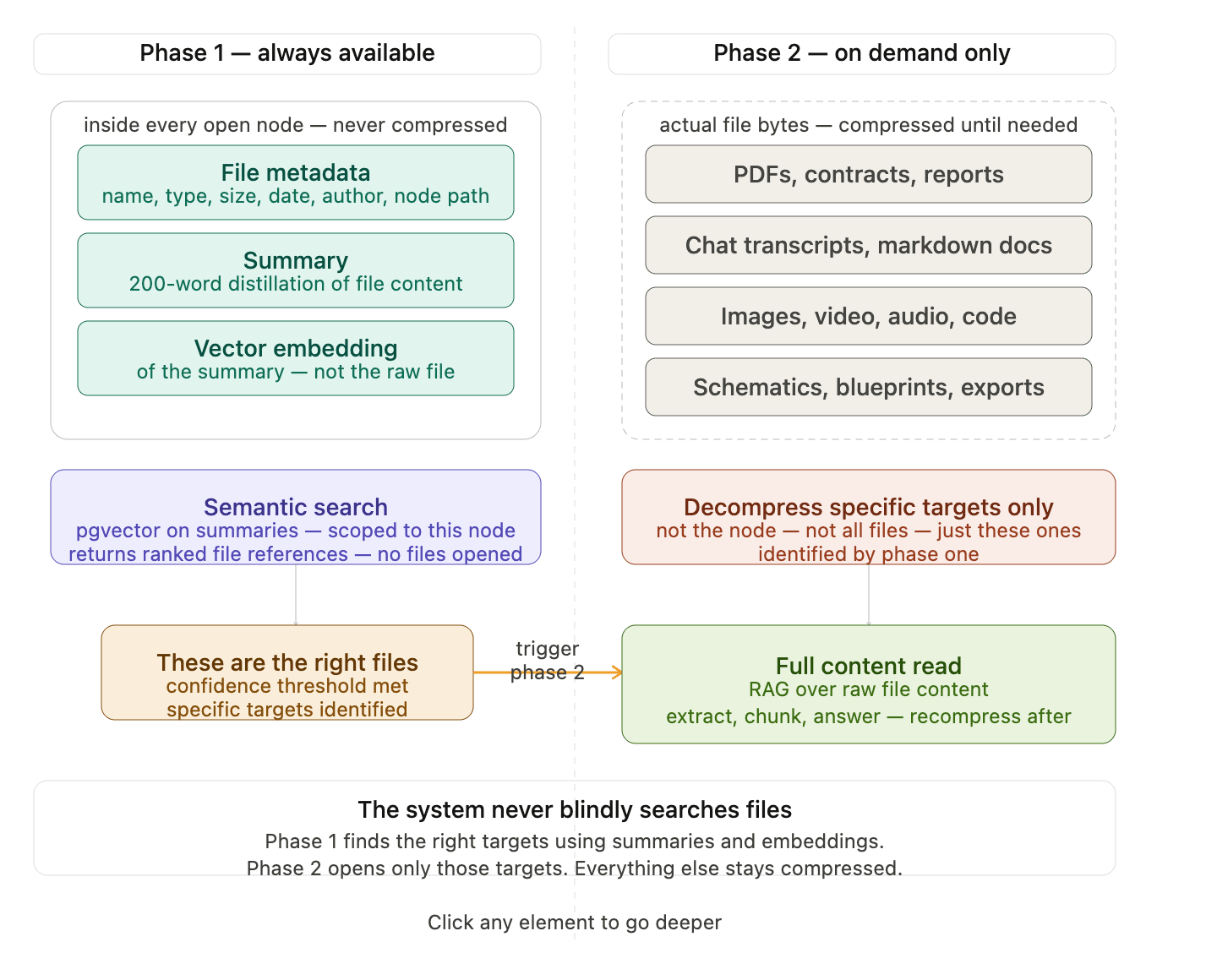
Section 3b — Node Provisioning
Describes how new nodes come into existence. Node creation is automatic. The system-level AI monitors conversations and events for the emergence of new concepts, relationships, projects, or Personas that are significant enough to warrant their own node. When such a concept is detected, the provisioning sequence runs without user intervention. The five-layer depth limit is a hard system constraint. The provisioning process checks the depth of the proposed node’s parent before creating anything. If the parent is already at Layer 5, the new concept is assigned to the most appropriate existing node rather than creating a Layer 6 node. This constraint exists for two reasons: to keep the graph navigable by both humans and the AI, and to prevent runaway node creation that would make compression and retrieval increasingly inefficient over time. Provisioning creates the Postgres schema for the new node, seeds the required table structure into that schema, registers the node in the graph index with its parent relationship and depth, and initializes the node’s shell with an empty manifest and a compression state of active. All of this happens in a single atomic transaction so that a partially provisioned node can never exist in a queryable state.Section 4 — The Two Storage Layers
This is the most important architectural concept in the entire document. Every other system in Neurigraph depends on understanding that each node contains two completely separate layers of storage that follow completely different rules. The metadata layer is always live and never compressed. It contains a summary of every piece of content the node holds, a keyword list for every piece of content, a vector embedding generated from each summary, and structured metadata fields including content type, creation date, last accessed date, source (conversation, event, file upload), and a pointer to the location of the actual file in Supabase Storage. This layer is the search infrastructure for the entire system. It is what makes cold searches instant. It is what allows the AI to know everything about a concept without opening a single file. The file layer is compressed by default. It contains the actual bytes of every piece of content associated with the node — conversation transcripts, PDFs, documents, images, video, audio, code files, exports, and anything else that has been stored. These files live in Supabase Storage organized in a path that mirrors the graph hierarchy. Compressed is the resting state. A file only leaves the compressed state when a retrieval operation has specifically identified it as a target. It returns to compressed shortly after. The relationship between these two layers is the core design insight of Neurigraph. The metadata layer makes compression viable — files can sleep indefinitely because their summaries stand in for them during every search. The file layer makes the metadata layer scale — because raw content is compressed and out of active storage, the metadata layer stays fast regardless of how many years of history accumulate. You search the metadata layer. You retrieve from the file layer. You never search the file layer directly.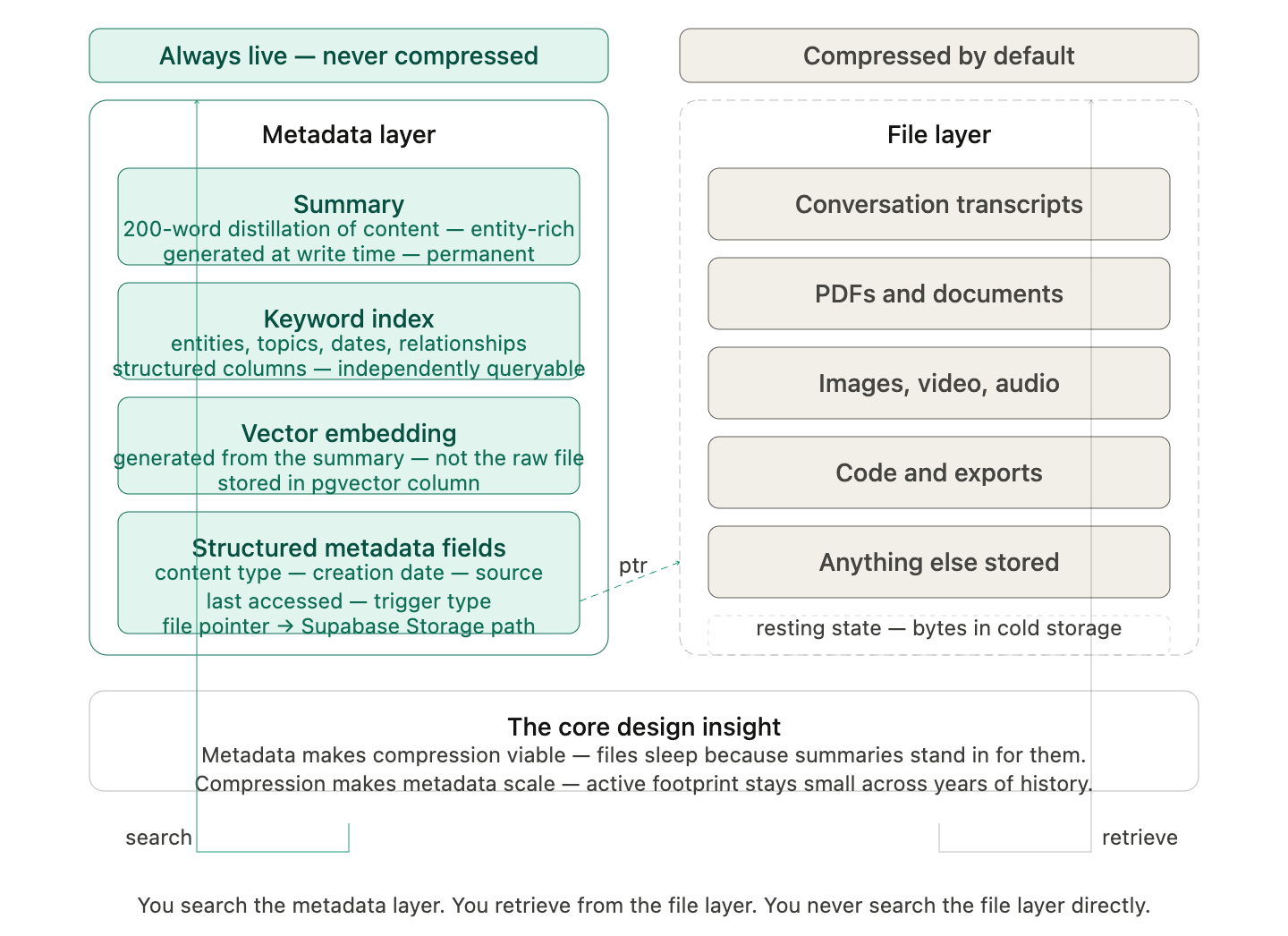
ptr) is the only connection between the two layers — a field in the metadata record that holds the Supabase Storage path for the corresponding compressed file. The metadata layer never touches file bytes. It only knows where they are.
Section 5 — Storage Triggers
Describes the three conditions that cause a memory to be written to Neurigraph. All three triggers hand off to the same write pipeline described in Section 6. The trigger type is recorded as metadata on the resulting memory record. The first trigger is conversation end. Any time a conversation closes — regardless of how long it was or how many tokens it contained — everything in that conversation that has not yet been stored is written as a memory record. A 10,000 token conversation that ends without hitting the chunk threshold still gets stored. Nothing is lost because a size minimum was never reached. The second trigger is the chunk threshold. If a conversation continues without ending and approaches approximately 500,000 tokens, the system watches for the next natural break point — the end of a response, the end of an exchange, the completion of a thought. When that break arrives, everything up to and including that completed response is stored as one memory chunk and a new chunk begins. The 500,000 token figure is a soft boundary, not a hard cut. The actual stored chunk may land anywhere in the range of roughly 480,000 to 620,000 tokens depending on where the natural break falls. A response is never interrupted mid-sentence or mid-thought to satisfy the threshold. The clean break is always the priority. The third trigger is an event boundary. Discrete real-world events — a meeting, a call, a work session, a project milestone — have natural start and end points that are more semantically meaningful than token counts. When an event ends, its contents are stored as a self-contained memory record regardless of size. A 20-minute meeting that produced 8,000 tokens is a complete unit of meaning and is stored as such.Section 6 — The Storage Pipeline
Describes the exact sequence of operations that runs from the moment a storage trigger fires to the moment a memory record is committed and queryable. This pipeline is the same regardless of which trigger initiated it. When a trigger fires, the system first identifies the content to be stored — the conversation segment, the event transcript, or the file — and determines which node or nodes it belongs to based on the concepts and entities it contains. The system-level AI makes this node assignment decision. If the content spans multiple concepts, it may produce multiple memory records assigned to different nodes. For each memory record, the pipeline then generates a natural language summary of the content, extracts a structured keyword list covering entities, concepts, topics, dates, and relationships, generates a vector embedding from the summary using the configured embedding model, and writes the metadata record to the target node’s schema — permanently and without compression. The raw content is then compressed and written to Supabase Storage at the path corresponding to the node’s location in the graph hierarchy. The metadata record’s file pointer is updated with the storage path. The node’s manifest is updated to include the new record. The graph index is updated if any new relationships were identified in the content. The entire pipeline is designed to be atomic per memory record. A failure at any step produces no partial record. The system retries failed steps with exponential backoff before logging a pipeline failure for manual review.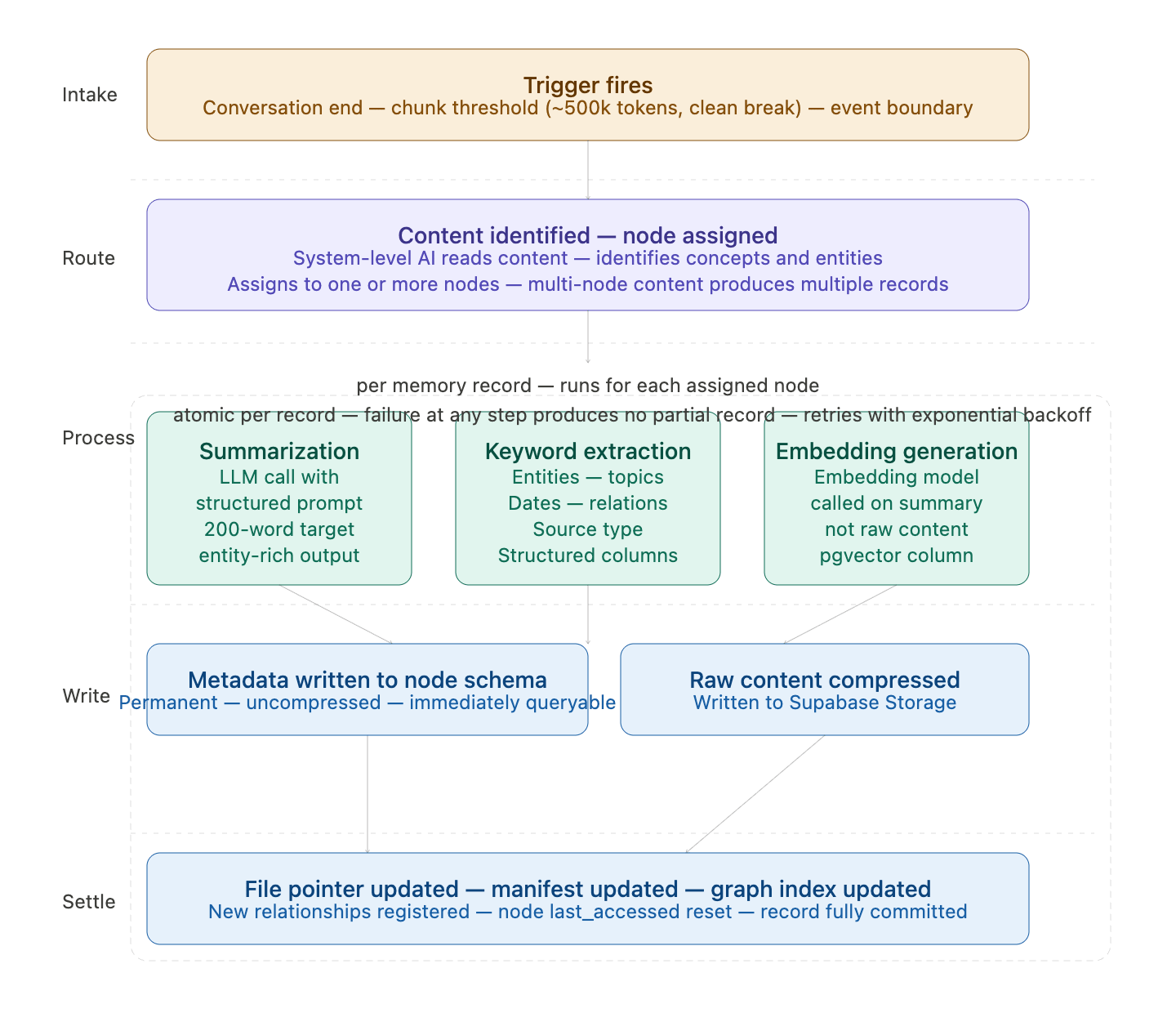
Section 6b — Summarization and Embedding Specification
Describes the technical implementation of the two most critical steps in the storage pipeline: generating the summary and generating the embedding. These steps determine how findable a memory will ever be. A poor summary produces a poor embedding, which makes the memory effectively unsearchable. Summarization uses a prompted language model call with a structured output format. The prompt instructs the model to produce a factual, entity-rich summary of a specified target length, prioritizing named entities, key decisions, action items, relationships established, and concepts introduced. The summary is not a narrative retelling — it is an information-dense index of what the content contains. Keyword extraction produces a structured set of fields: named entities (people, organizations, products, places), concept tags, temporal markers (dates, timeframes, relative references), relationship descriptors, and source classification. These fields are stored as structured columns, not as a flat keyword string, so they can be queried independently. Embedding generation calls the configured embedding model with the summary text as input and stores the resulting vector in the node’s pgvector-enabled embeddings table. The embedding is generated from the summary, not from the raw content. This is intentional — the summary is a distilled, information-dense representation that produces a more accurate semantic vector than a raw transcript would. Failure handling: if the embedding API is unavailable at write time, the metadata record is written without an embedding and flagged for asynchronous embedding generation. The record is queryable by keyword but not by semantic similarity until the embedding is generated. A background n8n job retries embedding generation for flagged records on a defined schedule.Section 7 — Compression Lifecycle
Describes the three states a node’s file content can be in, what moves content between states, and how the lifecycle is managed automatically. Active (Unzipped) state means the node’s files are uncompressed and immediately accessible in Supabase Storage’s standard retrieval tier. The node’s metadata layer is always live regardless of state. Active is the state immediately after content is written and after a node is rehydrated. Dormant (Zipped) state means the node’s files are compressed and written to a cold storage tier. The compression format used is gzip for text-based content and the storage provider’s native compression for binary content, applied at the individual file level rather than as a single archive for the whole node. This is critical — individual file compression means a single file can be decompressed without touching any other file in the same node. The node’s shell and metadata layer remain fully live in dormant state. The node is fully searchable. Only the file bytes are inaccessible without decompression. Rehydrating (Unzipping) state is the transitional state when a dormant file has been requested and decompression is in progress. The calling system receives a rehydrating signal and waits. Rehydration time is a deliberate feature of the architecture — it signals a context shift and is expected behavior, not an error condition.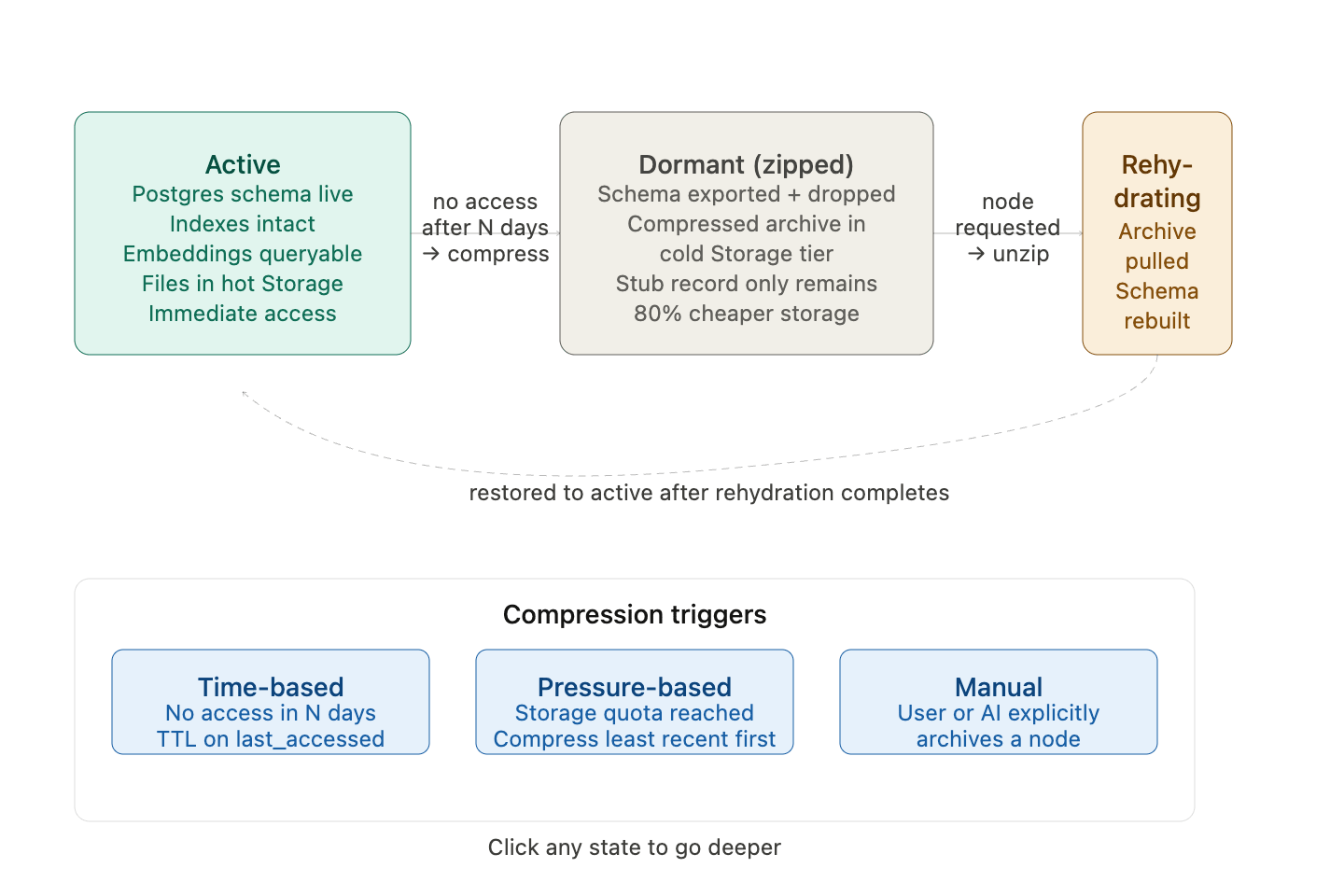
The rehydration wait is a feature, not a bug. When a user shifts from talking about business to suddenly asking about their health history, a brief pause while that node wakes up is actually appropriate. It signals a context shift. The system isn’t broken — it’s acknowledging that you’re moving somewhere that wasn’t part of the current working context. A human assistant doing the same job would say “give me a moment, let me pull those files.” The rehydration delay is that moment. It’s honest about what’s happening.The compression trigger is time-based. A background n8n job runs on a defined schedule and checks the last accessed timestamp of every node’s files. Files that have not been accessed within the configured dormancy threshold are compressed and moved to cold storage. The threshold is configurable at the system level with a sensible default. After a file is accessed through rehydration, its last accessed timestamp resets and the dormancy clock begins again. Recompression after retrieval uses a short TTL. Once a file has been retrieved and the query is complete, a TTL is set on that file’s active state. When the TTL expires without further access, the file recompresses automatically. This prevents retrieved files from accumulating in active storage indefinitely.
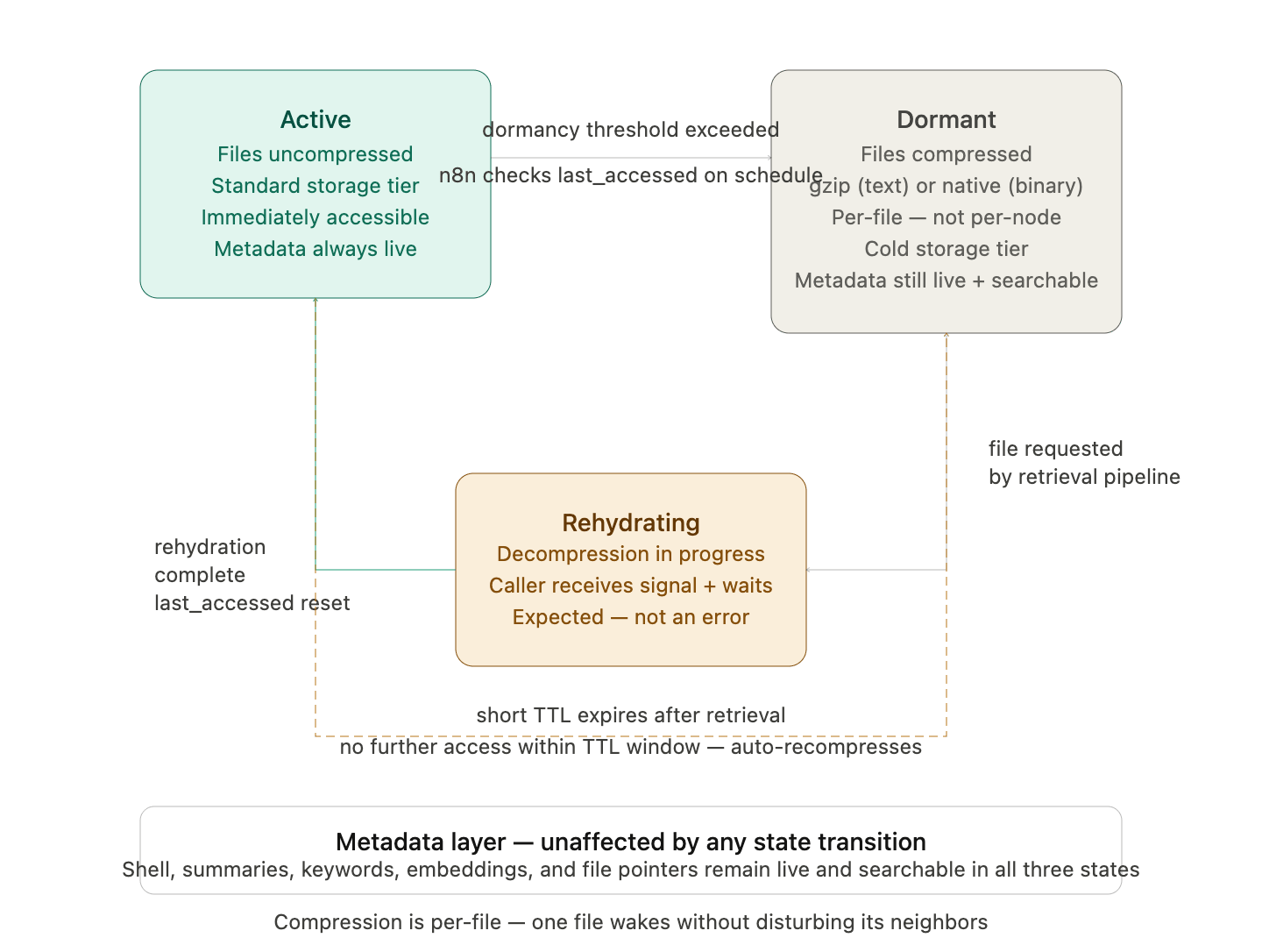
last_accessed on schedule.
The banner at the bottom is the most important constant in the diagram — the metadata layer sits completely outside the lifecycle. No state transition touches it. A dormant node is fully searchable. Only the file bytes go cold.
Section 7b — Memory as a Living Record
Describes the foundational concept that stored memories are not static snapshots. A memory record can change over time as new information is added, corrections are made, or understanding evolves. The storage system tracks these changes so that retrieval is time-aware — the system knows not only what is known but when it was known and how it has changed. This is what makes it possible for a Persona to reflect who a user is today while still being able to retrieve who they were two years ago. The memory system does not overwrite old records when information changes. It stores the delta — the change — alongside the existing record, with a time coordinate attached. The full history of a memory is always reconstructable by traversing its delta chain. This architecture uses a four-dimensional coordinate model where the first three dimensions represent the content’s conceptual position in the graph and the fourth dimension — w — represents time. A query can specify a point in time and the system will reconstruct the state of any memory record as it existed at that moment, similar to Apple’s Time Machine for files. The delta model also means storage costs for evolving memories are lower than a full-copy model. Only the changes are stored, not a new complete copy of the record each time something updates. The full technical specification of the coordinate system and delta storage implementation is documented in the aiConnected Security milestone specification. This section establishes the foundational concept as it applies to storage and retrieval. Any developer building the storage pipeline must understand that memory records are designed to evolve and that the write pipeline must support delta writes in addition to initial writes.Section 8 — The Retrieval Pipeline
Describes the exact sequence of operations that runs from the moment a query is received to the moment an answer is returned. Retrieval always follows the same sequence regardless of what is being asked. The pipeline begins with a search of the graph index for the entity, concept, or topic in the query. This is a name or keyword search, not a navigation. The system does not assume it knows where to look. It finds every anchor point across the entire graph where the query subject appears. This step is instant because the graph index is always live. Once anchor points are identified, the metadata layer of each relevant node surfaces immediately. Summaries, keywords, relationships, and timestamps are readable without decompression. In many cases this information is sufficient to answer the query completely. The AI assembles a response from metadata alone without opening a single file. When the metadata is not sufficient and specific file content is required, phase two begins. The system identifies which specific files are needed based on the phase one results. Only those files are decompressed. Not the node. Not the branch. Not adjacent files in the same node. Exactly the identified files. Those files are read, their content contributes to the answer, and they are flagged for recompression after a short TTL. Results from multiple nodes — for example, Dave appearing in Business, Family, and Hobbies simultaneously — are retrieved from each node independently and merged by the retrieval layer before being returned. Each node’s search runs in isolation. The merge happens at the end.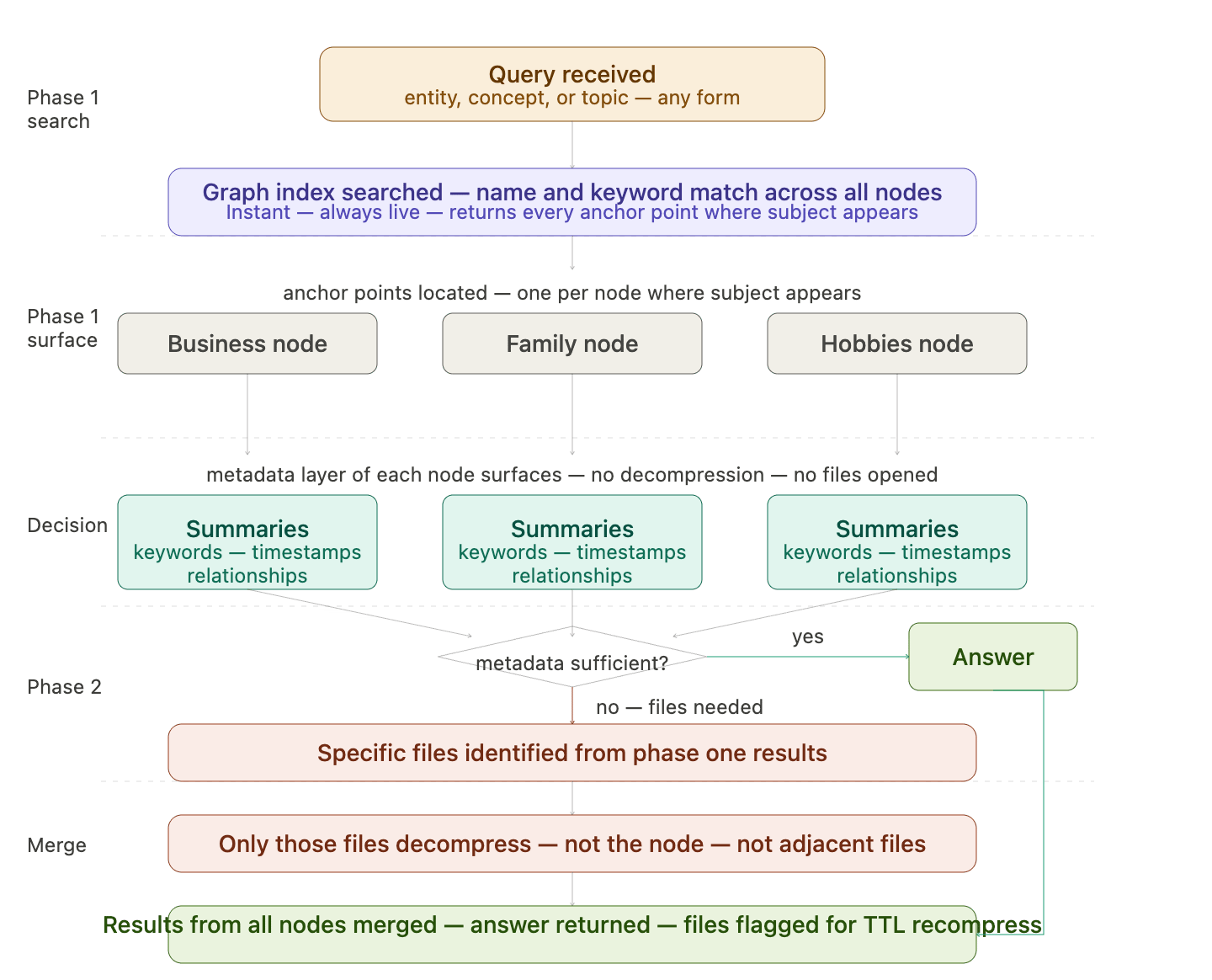
Section 8b — Predictive Warming Logic
Describes how the system anticipates likely follow-up queries and stages adjacent nodes for fast access before those queries arrive. When a retrieval operation identifies a target node, the system also reads that node’s relationship edges from the graph index and identifies the connected nodes. These connected nodes represent the first relationship layer. The system then reads those nodes’ relationship edges to identify the second relationship layer. Warming extends exactly three layers deep: the target node itself, its directly connected nodes, and the nodes connected to those connections. Warming stops at the third layer regardless of how many further relationships exist. Warming does not decompress files. It opens the shell of each warmed node, makes its metadata layer queryable, and stages the path to that node so that if a follow-up query targets it, there is no cold-start navigation delay. The files in warmed nodes remain compressed until a query explicitly targets them. Warming is a prediction, not a commitment. If the conversation does not move toward a warmed node, the warming state expires passively via TTL and those nodes return to their previous state without any files having been decompressed. No cost is incurred for a warming prediction that turned out to be wrong. Further warming beyond the third layer only occurs when the conversation explicitly moves to a currently warmed node and a new retrieval operation runs from there.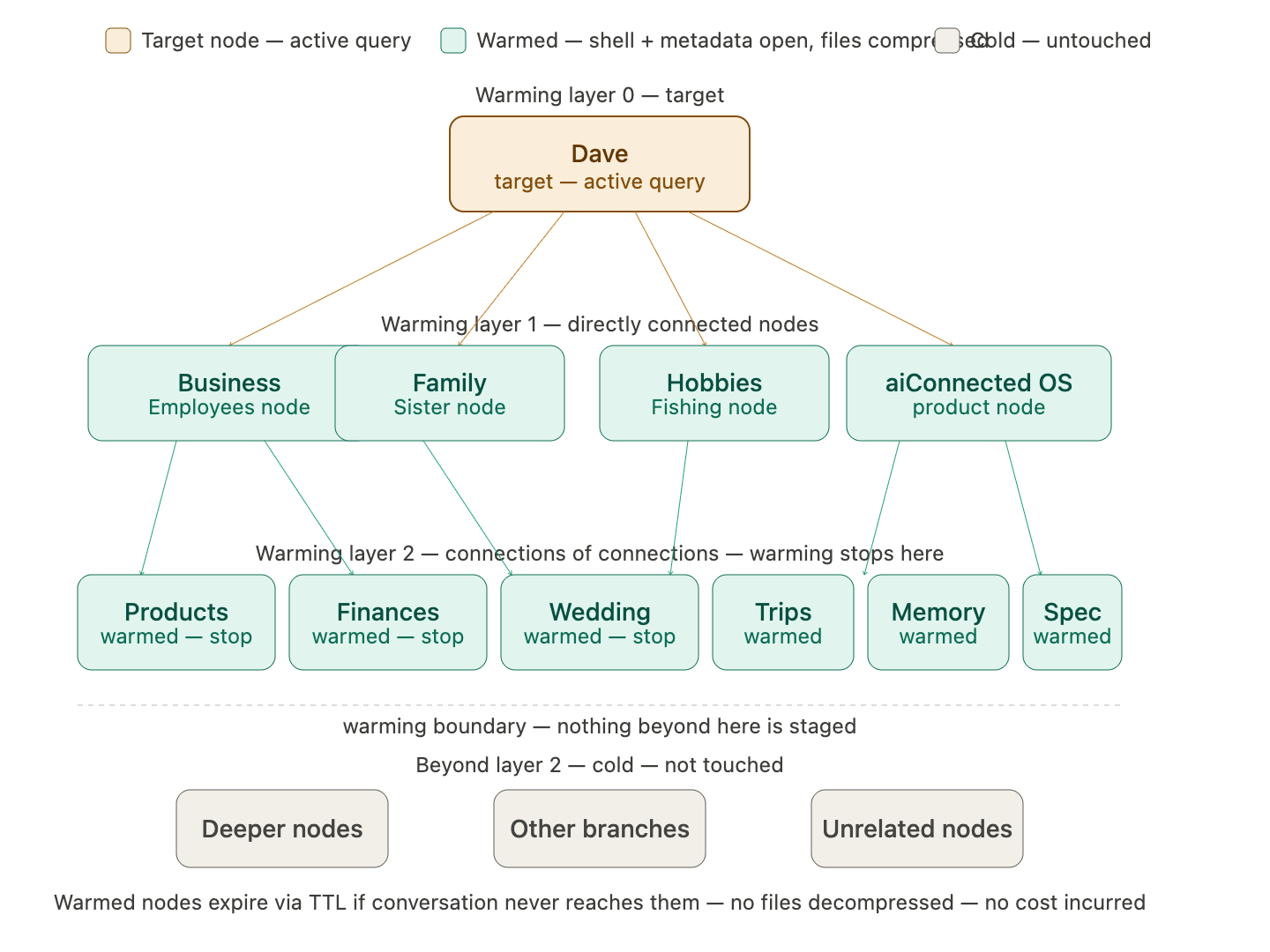
Section 9 — Security and Access Control
Describes who can read which nodes and how those rules are enforced at the database level. The user has full read and write access to their entire graph. No node within their graph is inaccessible to them. Personas have read access to their own node subtree by default. A Persona can read everything within its own node and all child nodes beneath it. It cannot read sibling nodes, parent nodes above its own, or any other branch of the graph unless access has been explicitly granted. This isolation ensures that a legal Persona cannot read the marketing Persona’s memory, and that a business Persona cannot read family or health nodes. Access grants are stored as explicit permission records in the graph index and are checked at query time. Third parties — external integrations, connected applications, APIs — have zero access by default. A user can grant a third party read access to a specific node on a case-by-case basis. For example, granting Gmail integration read access to the emails node. That grant applies only to the specified node and does not cascade to parent or sibling nodes. Grants are revocable at any time. All access control is enforced via Supabase row-level security policies applied at the schema level, not at the application layer.Section 10 — Table Structures
Defines the complete Postgres schema for every table in the Neurigraph storage and retrieval system. Each table definition includes column names, data types, constraints, indexes, and a brief description of what each column stores and why. Tables covered: the graph index (node registry, parent relationships, depth, schema names, edge registry), the metadata records table (per node schema, summary, keyword fields, embedding vector, file pointer, trigger type, timestamps), the file manifest (per node schema, file identity, compression state, storage path, last accessed, TTL), the compression state log (audit trail of compress and decompress events), the delta log (version history for evolving memory records with time coordinates), and the permission grants table (subject, target node, grant type, grantor, expiry).Table 1: graph_index
One shared table at the user root. Always live. Never compressed. The map of the entire graph.
Indexes:
node_name (cold search), user_id, last_accessed_at (n8n scheduler), parent_node_id
Table 2: metadata_records
One instance per node schema. Always live. Never compressed. The search infrastructure for every node.
Indexes:
embedding (ivfflat for pgvector), kw_entities (GIN), kw_topics (GIN), created_at, content_type
Table 3: file_manifest
One instance per node schema. Tracks every stored file at the individual file level. Compression is per file, not per node.
Indexes:
record_id (FK lookup), compression_state, last_accessed_at, recompress_after (n8n TTL sweep)
Table 4: compression_state_log
One shared audit table. Append-only. Records every compress and decompress event for every file. Never updated or deleted.
Indexes:
file_id, node_id, event_type, occurred_at
Note: Append-only. No updates or deletes. Provides full history of every state transition across the lifecycle.
Table 5: delta_log
One shared table. Stores the version history of every memory record using the w-axis time coordinate. Enables point-in-time reconstruction of any record — the mechanism that allows memory to evolve without overwriting history.
Indexes:
record_id, w_coordinate
Note: Append-only. Reconstruct any past state of a record by traversing its delta chain backward from a target w_coordinate. Full specification of delta resolution is documented in the aiConnected Security milestone specification.
Table 6: permission_grants
One shared table. Controls all cross-persona and third-party access to specific nodes. Access is always to a single named node — it does not cascade to parents, siblings, or children.
Indexes:
subject_id, target_node_id, subject_type, revoked_at
Access rules enforced at the database layer via Supabase row-level security policies — not at the application layer.
Relationship Map
graph_index. The graph index is the root of all relational integrity in the system.